



For years, design systems gave us stability.
Buttons, inputs, cards, modals.
Predictable patterns.
Reusable components.
They helped teams ship faster and stay consistent.
But AI-first products are changing the rules.
Interfaces are no longer fully predefined.
They are generated, adaptive, and context-aware.
And suddenly, many traditional design systems feel… incomplete.
Not broken.
Just not built for this new reality.
This issue explores what breaks when AI enters the interface, and how teams are evolving design systems for generative experiences.
In This Issue
• What design systems were originally built for
• Why AI changes interface behavior
• What breaks in traditional systems
• New patterns emerging in AI-first products
• How teams are evolving their systems
• Take-Home Exercise
• Resource Corner
But first…..
Master UX & Product Management Collaboration
Good products don’t come from one team getting their way. They come from UX and Product actually understanding each other, the tradeoffs, the constraints, the “why did we build it like this” conversations that happen before anything ships.
On March 5, we’re getting into all of it.

Five practitioners who live at this intersection every day will break down how collaboration really works, not the idealized version, but the messy, political, human version. How do you move things forward when you don’t have the title to make the call? What do you do when the process breaks down mid-sprint?
How do you bring AI into your workflow without losing the human judgment that makes design meaningful?
Ivan Carter — 20+ years as a product designer — brings the craft perspective. Leo Hoar, PhD Hoar built the UXR Institute because he got tired of research being ignored. Tadinee Marsili Marsili has spent 15 years turning design into strategy, not just output. Caitlin Cooper knows how to get the right decisions through organizations that don’t always make it easy. And Teyibo D. thinks about what design and product collaboration looks like at a systems level, across teams, companies, and communities.
You’ll leave with real frameworks, shared language, and ideas you can actually use with your team the following week, not someday.
back to where we stopped…..
What design systems were built for
Traditional design systems were designed for predictability.
Predictability means interfaces behave the same way every time.
Examples:
• A button always looks the same
• A modal always opens the same way
• A form always follows the same layout
This works well when:
• Flows are predefined
• Content is fixed
• User paths are known
Design systems optimized for scale and consistency.
They reduced chaos across large teams.
Why AI changes interface behavior
AI introduces variability.
Variability means the interface can change depending on:
• User intent
• Context
• Input complexity
• Generated content
In AI-first products:
• Text can be unpredictable
• Layouts expand dynamically
• Responses vary in length
• Actions emerge mid-flow
This makes interfaces less deterministic.
Deterministic means predictable and repeatable.
And that’s where tension begins.
What breaks in traditional systems
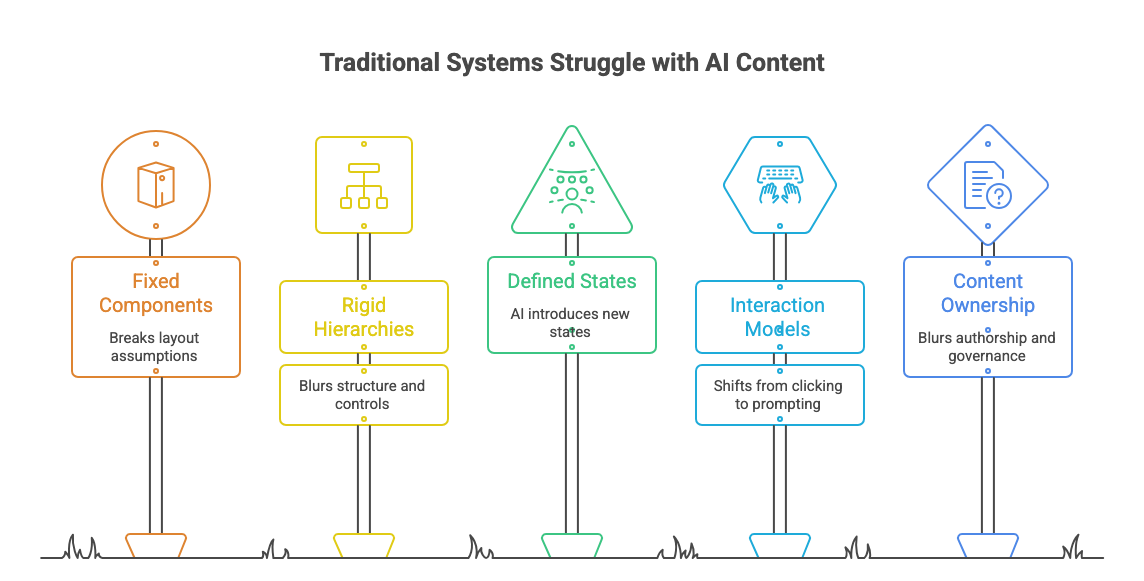
1. Fixed components struggle with dynamic content
A card designed for two lines of text may suddenly hold paragraphs.
Generated content breaks layout assumptions.
2. Rigid hierarchies fail
Traditional systems assume clear structure:
Header → Body → Actions.
AI outputs often blur this structure.
Content and controls mix together.
3. States become harder to define
Classic components have defined states:
Default, hover, loading, error.
AI introduces new states:
• Thinking
• Streaming
• Revising
• Regenerating
These were not part of original systems.
4. Interaction models shift
Instead of clicking through flows, users now:
• Prompt
• Refine
• Interrupt
• Iterate
Iteration-heavy interaction was not central in older systems.
5. Content ownership becomes unclear
Who controls the UI now?
Designers? Engineers? The model?
Generated UI blurs authorship.
This creates governance challenges.
New patterns emerging in AI-first products
Teams are already evolving patterns.
Here’s what we are seeing.
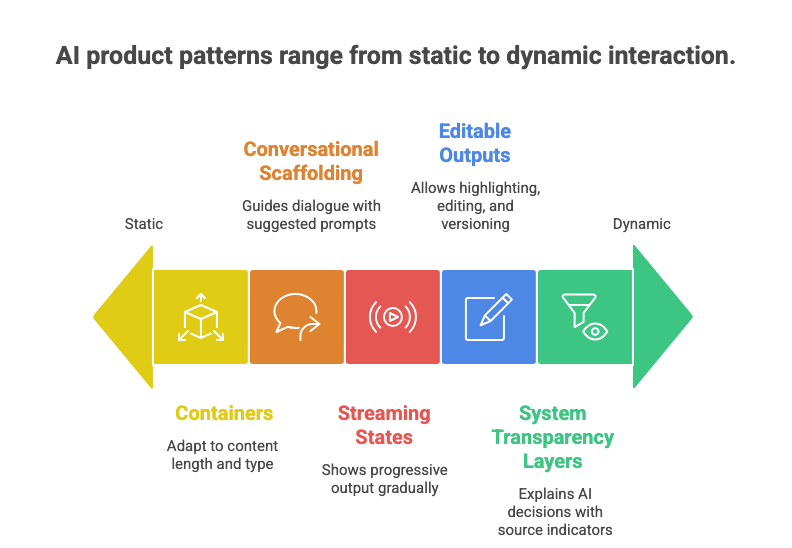
1. Containers instead of rigid components
Flexible containers adapt to content length and type.
Think:
Expandable surfaces, adaptive cards, fluid layouts.
2. Conversational scaffolding
Interfaces now guide dialogue.
Examples:
• Suggested prompts
• Inline editing
• Follow-up chips
These patterns support iterative interaction.
3. Streaming states
Instead of static loading spinners, systems show progressive output.
Streaming means content appears gradually.
This requires new motion and feedback patterns.
4. Editable outputs
Generated content is rarely final.
So outputs are now:
• Highlightable
• Editable
• Versioned
The interface becomes collaborative.
5. System transparency layers
AI interfaces increasingly explain themselves.
Examples:
• “Why this answer?”
• Source indicators
• Confidence signals
These build trust.
How teams are evolving design systems
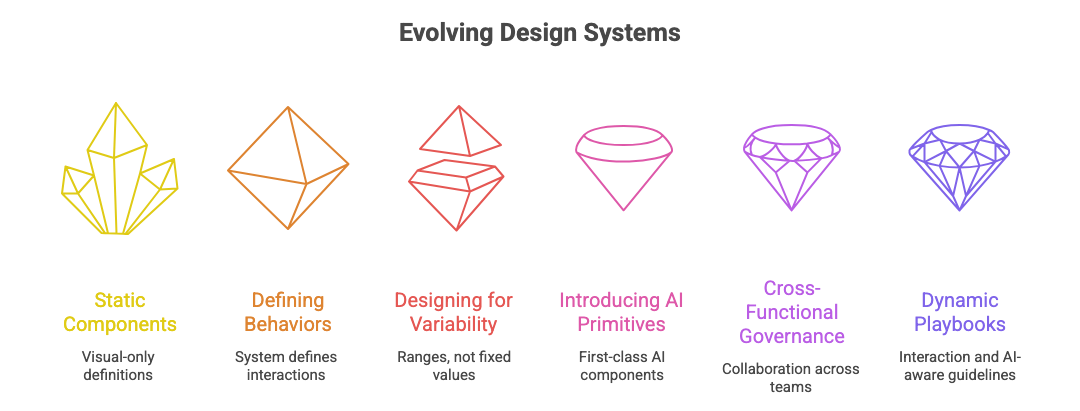
Forward-thinking teams are not abandoning systems.
They are expanding them.
Here’s how.
1. From components to behaviors
Instead of defining only visuals, systems define behaviors.
Example:
How streaming works
How regeneration behaves
How interruption is handled
2. Designing for variability
Teams now design for ranges, not fixed values.
Example:
Minimum and maximum content scenarios.
3. Introducing AI primitives
New system primitives include:
• Prompt input patterns
• Response blocks
• Confidence indicators
• Edit states
These become first-class components.
4. Cross-functional governance
AI systems require collaboration across:
• Design
• Engineering
• ML teams
Design systems now include model-aware guidelines.
5. Documentation evolves
Static component docs are not enough.
Teams now document:
• Interaction principles
• AI tone and behavior
• Failure patterns
Systems become more like playbooks.
What this means for designers
If you work with design systems, your role is expanding.
You are no longer just designing UI kits.
You are shaping:
• Interaction logic
• System behavior
• Human-AI collaboration patterns
This is a shift from visual consistency to experiential consistency.
Take-Home Exercise
Use this to evaluate your current design system.
Identify one component that assumes fixed content
Test it with long, generated output
List what breaks (layout, hierarchy, clarity)
Redesign it as a flexible container
Define one new AI state (e.g., streaming or revising)
This helps move your system toward AI readiness.
Resource Corner
AI-First Product Design Principles: A Comprehensive ...
Building AI-First Products: A New Paradigm in User ...
Final Thought
Design systems brought order to product design.
But AI introduces a new kind of complexity.
Not visual chaos.
Behavioral complexity.
The next generation of design systems will not just define components.
They will define how products think, respond, and evolve.
The question is no longer:
“Is this component consistent?”
It is now:
“Is this experience adaptable?”
That is the shift.


