



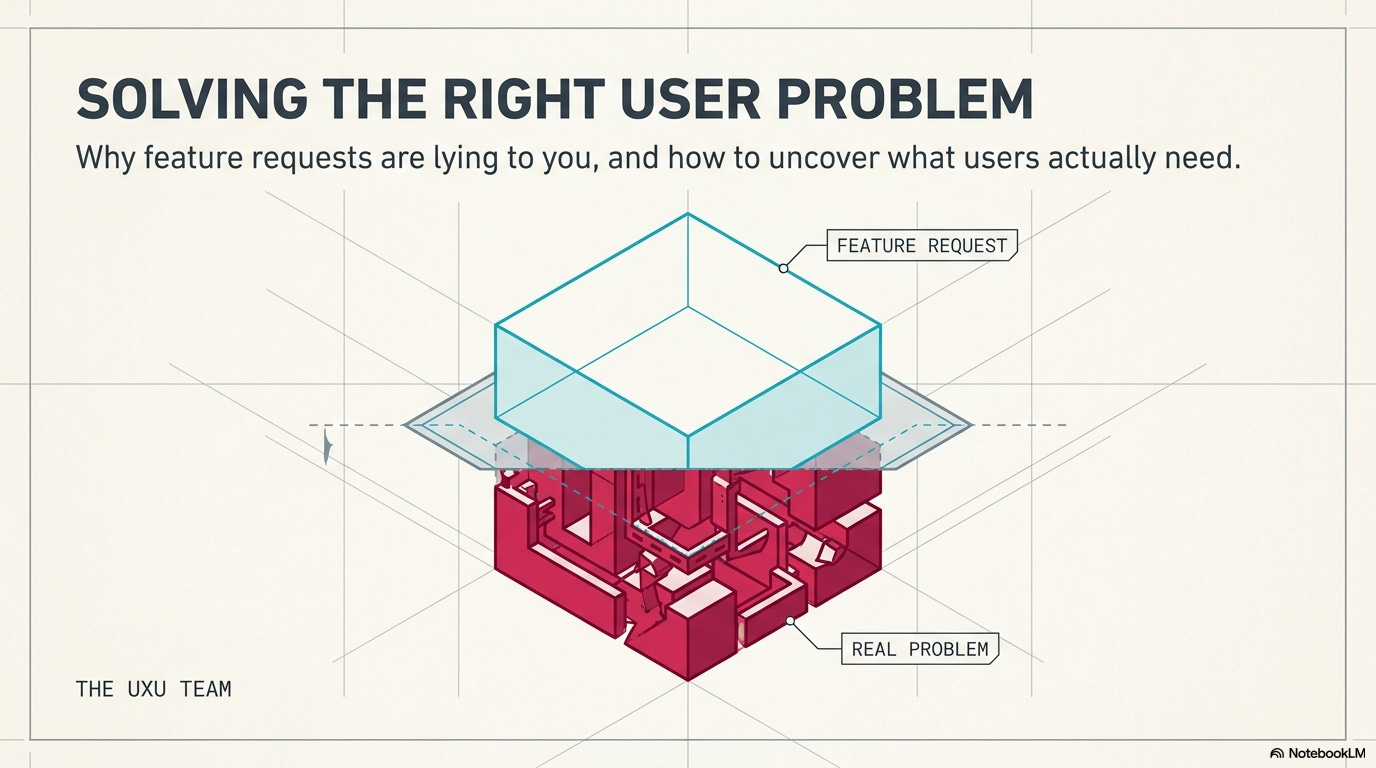
Your team just spent three months building a feature users requested. You shipped it. Usage is at 4%. Meanwhile, the actual problem, the one nobody articulated clearly, is still there, and users are still frustrated. This happens constantly: teams hear “we need feature X” and build feature X, when the real need was something completely different.
Here’s why listening to users doesn’t mean doing what they say, how to identify the actual problem underneath feature requests, and what to ask before you waste months solving the wrong thing.
In this issue we’ll cover:
Why feature requests are symptoms, not solutions
The questions users answer vs. the questions you should ask
How to dig past surface requests to real needs
Red flags that you’re solving the wrong problem
What to do when stakeholders and users want different things
📦 Resource Corner
💭 Final Thought
Why feature requests are symptoms, not solutions
Someone submits a feature request: “We need dark mode.”
You could just build dark mode. Or you could ask: why do they want dark mode?
Possible real reasons:
Eye strain from bright screens during long sessions
Working late at night and the bright UI is disruptive
Accessibility needs for light sensitivity
They’ve seen it in other apps and expect it
They think it looks more professional
Each of these suggests a different solution. Maybe the real fix is reducing overall brightness, not adding dark mode. Maybe it’s better contrast ratios. Maybe it’s scheduled themes. Maybe it’s nothing to do with color at all.
The pattern:
Users experience a problem → They imagine a solution → They request that solution as a feature
But their imagined solution might not be the best one. Or even a good one.
Example 1: “We need bulk edit”
What users say: “I want to edit multiple items at once.”
What they might actually need:
Faster editing of individual items (better shortcuts, autofill)
Fewer errors to fix (better validation upfront)
Templates for common patterns (so they don’t need to edit)
Smart defaults that reduce manual work
Building bulk edit solves the stated request but might miss the real inefficiency in their workflow.
Example 2: “We need more filter options”
What users say: “Add filters for date range, status, category, and tags.”
What they might actually need:
Better search that finds things without complex filtering
Saved views for common filter combinations
AI-powered suggestions that surface relevant items automatically
Less data clutter so filtering isn’t necessary
Adding more filters makes the interface more complex. The real problem might be information overload, not lack of filtering capability.
Example 3: “We need better notifications”
What users say: “Send me notifications for every update.”
What they might actually need:
Fewer updates worth notifying about (reduce noise)
Better in-app indicators they can check when ready (pull vs. push)
Digest summaries instead of individual pings
Confidence that they won’t miss critical updates (trust issue)
Building more notifications creates notification fatigue. The real need might be the opposite: less interruption, more control.
The lesson:
Feature requests tell you where users are experiencing friction. They don’t tell you the best way to remove that friction.
Your job isn’t to build what users request. Your job is to solve the problem they’re experiencing.
💡 Reality check: If you just build requested features, you’re a feature factory, not a problem solver.
The questions users answer vs. the questions you should ask
Users are bad at articulating their needs. Not because they’re dumb, but because they’re not designers. They describe symptoms and suggest solutions based on patterns they’ve seen elsewhere.
Your job is to ask better questions that reveal the actual problem.
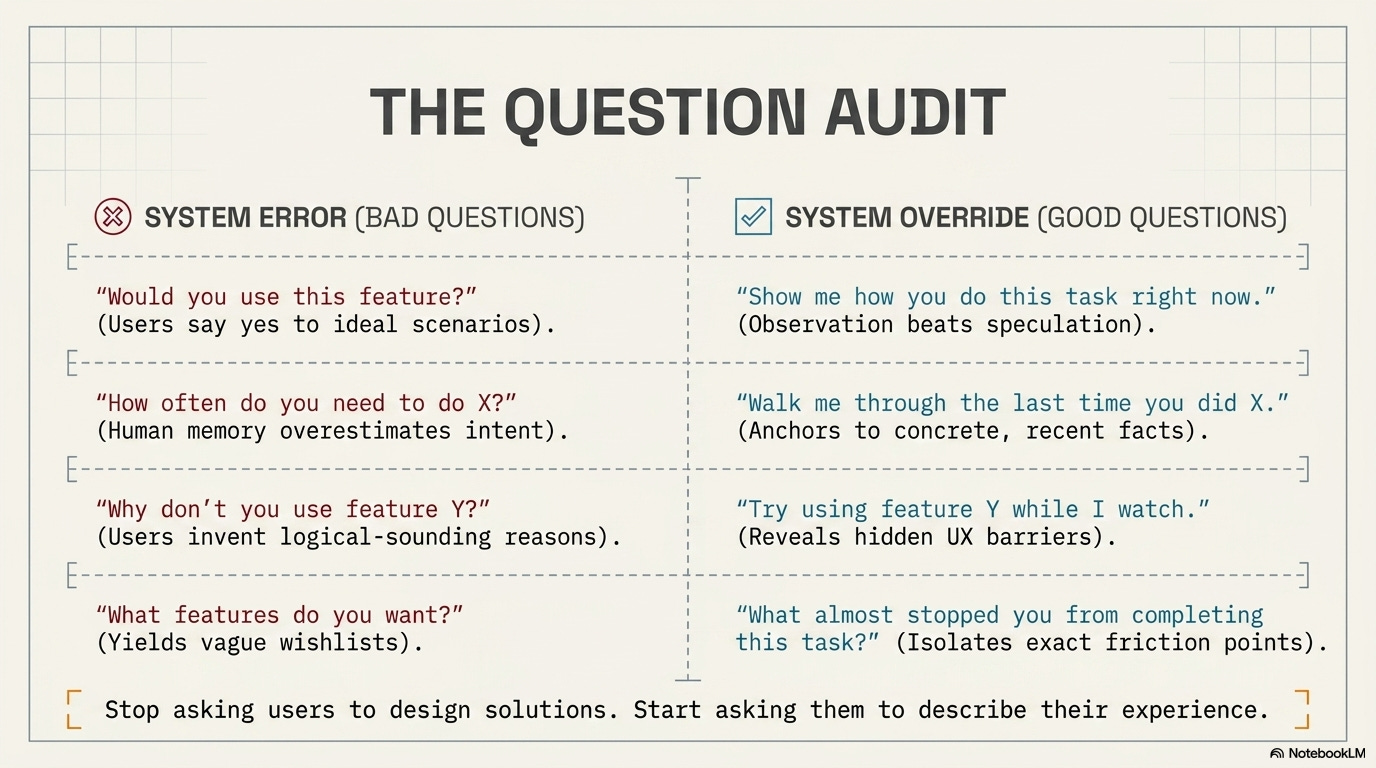
❌ Bad question: “What features do you want?”
Why it fails: You get a wish list of features, not insights into problems. Users suggest things they’ve seen elsewhere without knowing if those things would actually help them.
✅ Better question: “What’s frustrating about how you currently do this?”
Why it works: You learn about pain points, not preconceived solutions. You can design solutions they haven’t imagined.
❌ Bad question: “Would you use this feature if we built it?”
Why it fails: Users always say yes to hypotheticals. They imagine the best-case version and overlook downsides. Then you build it and they don’t use it.
✅ Better question: “Show me how you do this task right now.”
Why it works: Observation beats speculation. You see the actual workflow, workarounds, and context. You spot problems they’ve normalized and don’t even mention.
❌ Bad question: “How often do you need to do X?”
Why it fails: Memory is unreliable. Users overestimate frequency of things they think they should do and underestimate habitual actions. The data is wrong.
✅ Better question: “Walk me through the last time you did X.”
Why it works: Specific recent examples are more accurate than general patterns. You get real details about context, sequence, and obstacles.
❌ Bad question: “Why don’t you use feature Y?”
Why it fails: Users rationalize after the fact. They give you logical-sounding reasons that might not be the real cause of their behavior.
✅ Better question: “Can you try using feature Y while I watch?”
Why it works: You see the actual barriers. Discoverability issues. Confusing UX. Mismatched mental models. Things users couldn’t articulate in abstract conversation.
❌ Bad question: “What would make this better?”
Why it fails: Too broad. You get vague answers like “make it faster” or “make it easier” without actionable specifics.
✅ Better question: “What almost stopped you from completing this task?”
Why it works: Focuses on specific friction points. You learn what nearly caused failure, which reveals high-priority problems.
The pattern:
Stop asking users to design solutions. Start asking them to describe their experience, show their workflow, and explain their struggles.
The insights come from observation and specific examples, not hypotheticals and generalizations.
How to dig past surface requests to real needs
Someone says “we need feature X.” Here’s your playbook for finding the real problem:
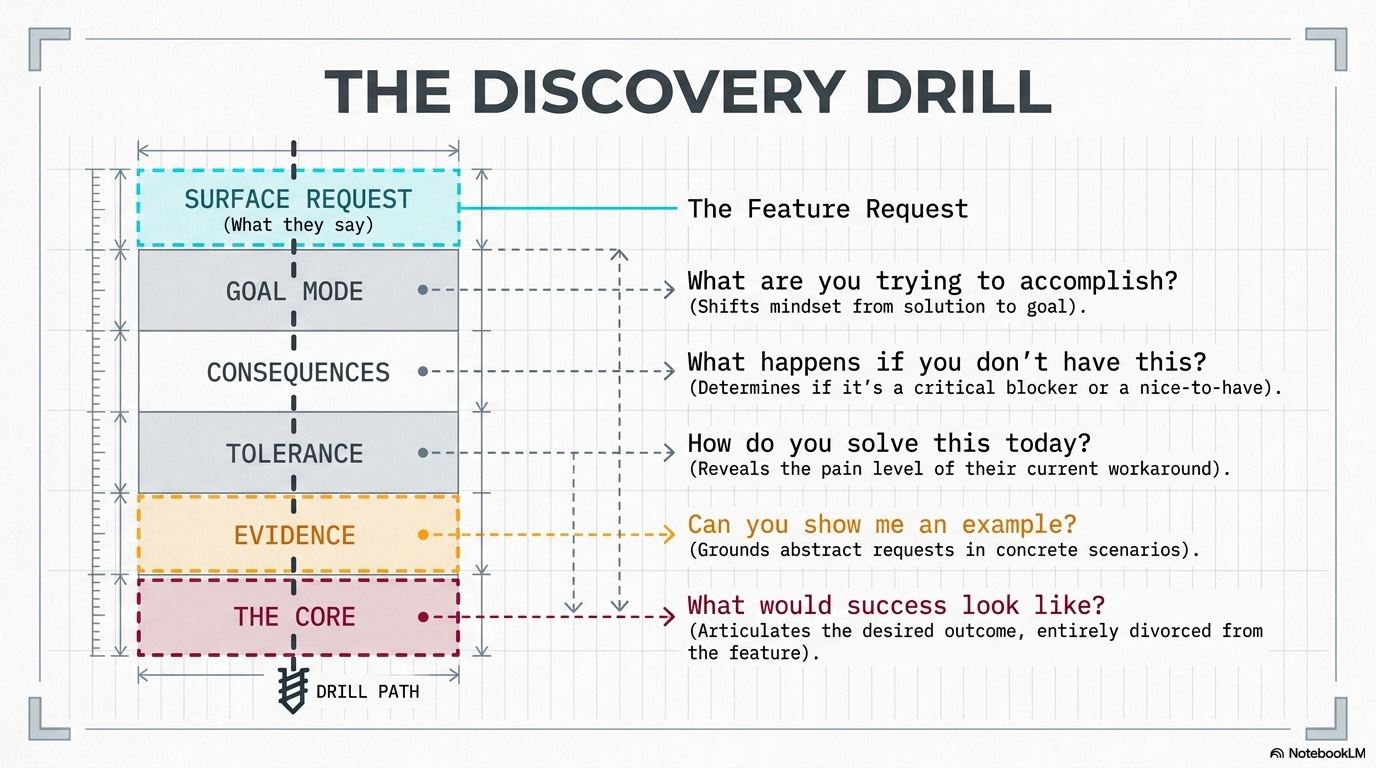
Step 1: Ask “what are you trying to accomplish?”
Get them out of solution mode and into goal mode.
User: “We need an export to Excel button.”
You: “What are you trying to do with the data once it’s in Excel?”
User: “I need to add a column with some calculations, then share it with my manager.”
Real need: Might not be export. Might be adding custom calculations in-app, or better sharing options, or a report template that does the calculations automatically.
Step 2: Ask “what happens if you don’t have this?”
Understand the consequences. Is this a critical blocker or a nice-to-have?
User: “We need dark mode.”
You: “What happens if we don’t add dark mode?”
User: “I get eye strain working late and have to lower my screen brightness, which makes it hard to see details.”
Real need: Reducing eye strain. Dark mode is one solution. Better contrast, adjustable UI brightness, or night-shift color temperature might also work.
Step 3: Ask “how do you solve this problem today?”
Their current workaround reveals what they actually need and how much friction they’re willing to tolerate.
User: “We need bulk actions.”
You: “How do you handle this now when you need to update multiple items?”
User: “I export to a spreadsheet, make changes there, then manually re-enter the data.”
Real need: The workaround is incredibly painful, so bulk actions are genuinely valuable. But you also learned they’re comfortable with spreadsheet workflows, which might inform the design.
Step 4: Ask “can you show me an example?”
Abstract requests become concrete when grounded in real scenarios.
User: “We need better search.”
You: “Can you show me a recent search that didn’t work well?”
User: “I searched for ‘Johnson project proposal’ and it didn’t find the document even though I know it exists.”
Real need: The search can’t handle multi-word queries or doesn’t index document content. That’s a specific, solvable problem different from generic “better search.”
Step 5: Ask “what would success look like?”
Help them articulate the desired outcome rather than the requested feature.
User: “We need more customization options.”
You: “If you could customize exactly what you needed, what would that let you do?”
User: “I’d set up my dashboard to show only the projects I’m actively working on, not everything.”
Real need: Filtering, not customization. A “my active projects” view solves this without adding complex customization UI.
The goal:
By the end of this questioning, you should understand:
✓ The actual problem they’re experiencing
✓ Why it’s a problem (context and consequences)
✓ How they currently cope with it
✓ What success would look like
Only then do you start designing solutions.
🎯 Take-home: Spend more time understanding the problem than building the solution. Get the problem right, and the solution becomes obvious.
Quick pause for something important….
🎯 UXCON26: Learn Problem-Framing From People Who’ve Solved Real Ones

That skill, knowing what problem to solve, is worth more than any tool or technique. And you can’t learn it from articles. You learn it from people who’ve done it, made mistakes, and figured it out.
At UXCON26, you’ll meet UXers who know exactly how to do that. The ones who’ve learnt to say “I don’t think we’re solving the right problem” in rooms full of executives. The ones who’ve killed projects that would’ve wasted months. The ones who know how to dig until they find the real need.
The conversations between sessions? The workshops on discovery and problem framing? That’s where this stuff actually sinks in.
Back to identifying the real problem.
Red flags that you’re solving the wrong problem
Sometimes you don’t catch it during discovery. You’re already designing or building. Here are the warning signs that you’re on the wrong track:
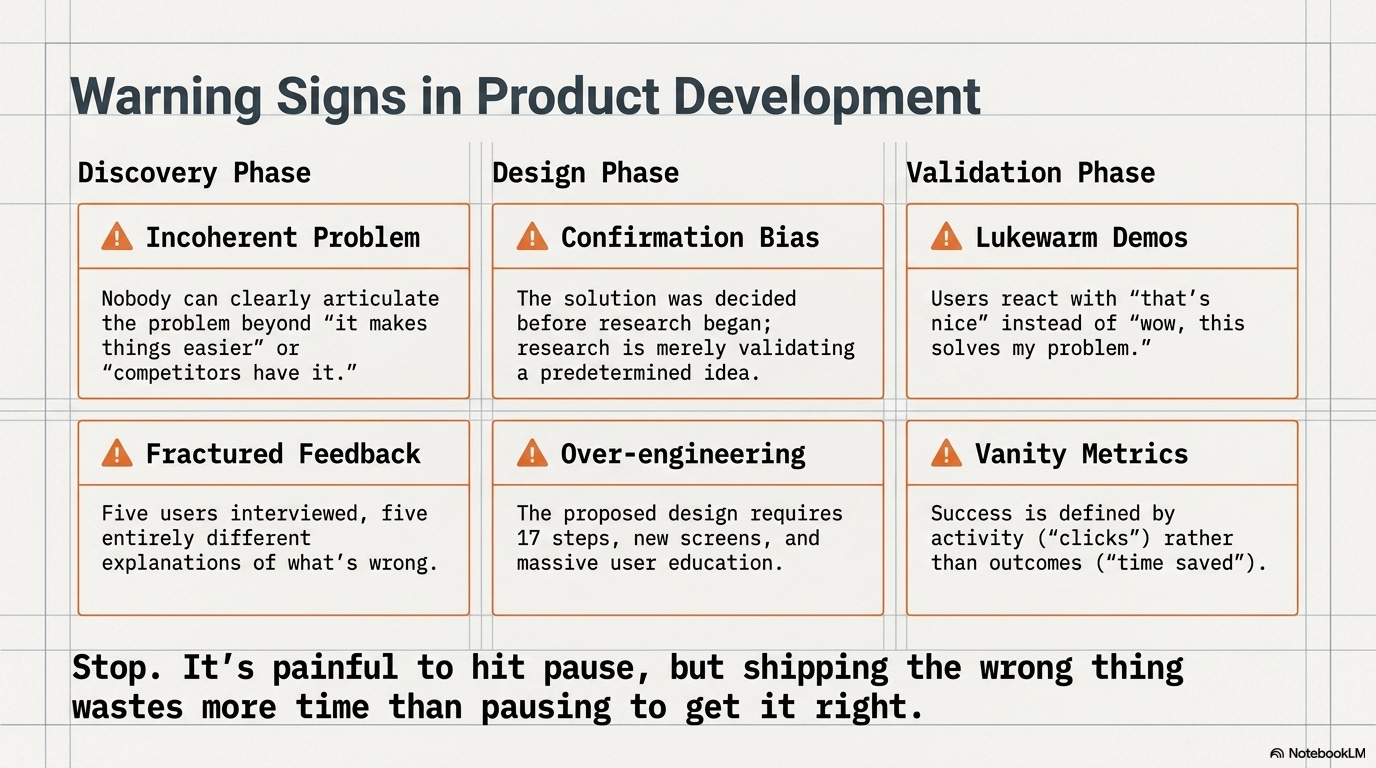
🚩 Red flag 1: Nobody can clearly articulate the user problem
You ask “what problem does this solve?” and get vague answers like:
“It makes things easier”
“Users have been asking for it”
“Competitors have it”
“It’s a nice-to-have”
What it means: You’re building a feature, not solving a problem. Stop and do actual problem discovery.
🚩 Red flag 2: The solution came before the research
The stakeholder already decided what to build before talking to users. Research is being done to validate the predetermined solution, not explore the problem.
What it means: You’re doing confirmation bias research. The feature might work, but you’re not optimizing for the real need.
🚩 Red flag 3: Every user describes the problem differently
You interview five users and get five different explanations of what’s wrong. There’s no common thread or pattern.
What it means: Either you’re talking to the wrong users, asking the wrong questions, or there isn’t actually a coherent problem to solve.
🚩 Red flag 4: The proposed solution is very complex
The design requires 17 steps, multiple new screens, and extensive user education. It feels overbuilt.
What it means: You might be solving the wrong problem. Good solutions to real problems are usually simpler than this.
🚩 Red flag 5: Users don’t seem excited when you show them
You demo the solution and get lukewarm reactions. “That’s nice” instead of “oh wow, this solves my problem.”
What it means: It’s not addressing the pain point they actually care about. Go back to problem definition.
🚩 Red flag 6: The success metrics are activity-based, not outcome-based
You’re measuring “number of times feature is used” instead of “how much time/money users saved” or “reduction in error rate.”
What it means: You don’t actually know if this solves a meaningful problem. Activity metrics can be gamed or meaningless.
When you spot these flags:
Stop. Don’t build more. Go back to problem discovery.
It’s painful to hit pause. But shipping the wrong thing wastes more time than pausing to get it right.
What to do when stakeholders and users want different things
This is the classic dilemma: users want X, but stakeholders want Y. How do you navigate this?
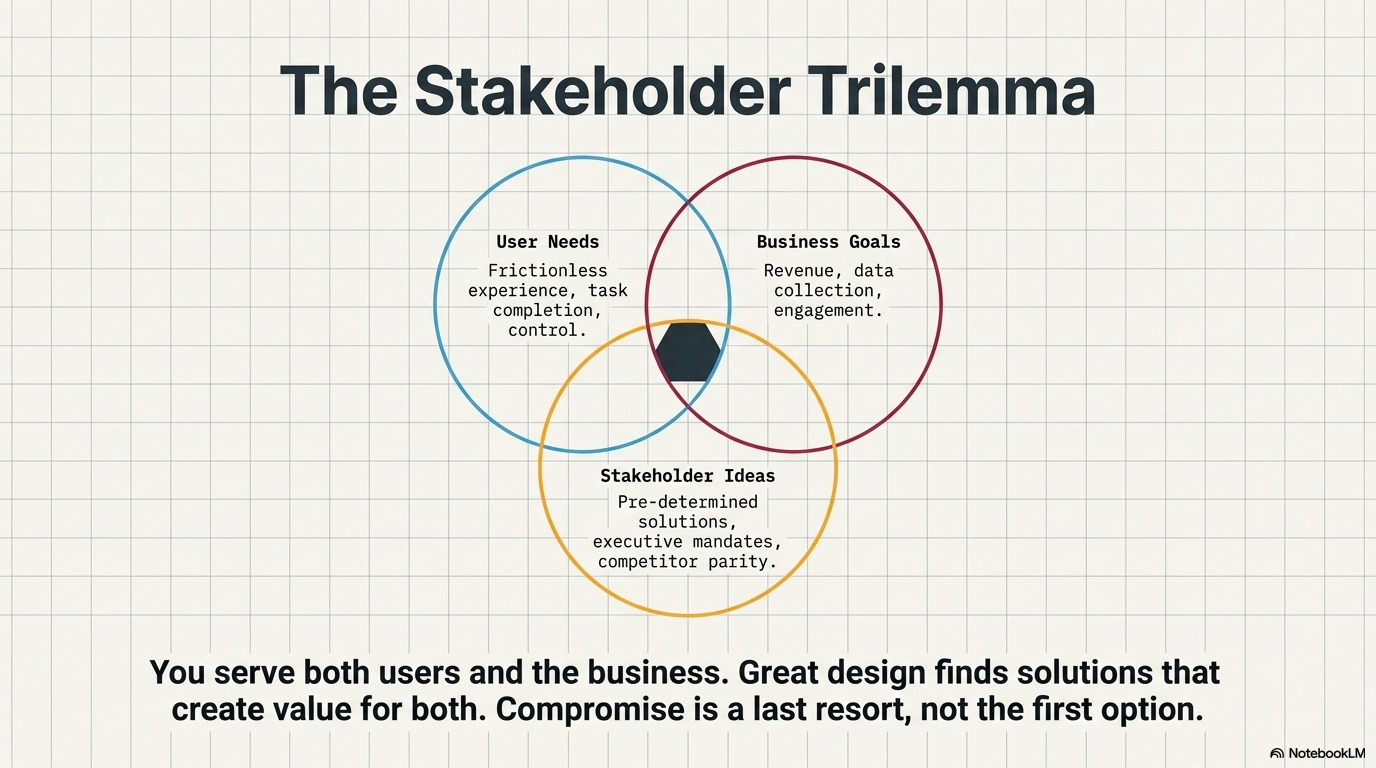
Scenario 1: Business goal conflicts with user need
Example: Users want a simpler checkout with fewer steps. Business wants to collect more customer data during checkout.
How to handle it:
Find the underlying needs on both sides
Business needs data for marketing. Why? To send relevant offers.
Users need speed. Why? They’re buying impulsively and abandon if it takes too long.
Solution space: Collect data post-purchase. Fast checkout now, profile building later. Both needs met.
The principle: Don’t compromise. Find solutions that serve both needs. They usually exist if you reframe the problem.
Scenario 2: Stakeholder wants a feature users haven’t requested
Example: Executive wants AI-powered recommendations. Users never mentioned needing this.
How to handle it:
Ask the stakeholder: “What problem does this solve for users or the business?”
If there’s a valid problem (increasing engagement, reducing choice paralysis), research if users actually experience it.
If users don’t have this problem, show data and propose alternatives that address the real user needs.
If the stakeholder insists anyway, document the decision and proceed (you won’t win every battle).
The principle: Seek to understand the stakeholder’s goal, not just reject their idea. Sometimes they see a problem you missed. Sometimes they’re wrong.
Scenario 3: Users request something that would hurt the business
Example: Users want to remove all ads. That’s the revenue model.
How to handle it:
Understand what users actually dislike (intrusive ads? Too many? Irrelevant?)
Find ways to reduce the pain without killing the business model
Solution space: Fewer ads, better targeted, less intrusive formats. Better, not gone.
The principle: Users don’t care about your business model, but you do. Find ways to reduce friction while maintaining viability.
The balance:
You serve both users and the business. Great design finds solutions that create value for both. Compromise is a last resort, not the first option.
📦 Resource Corner
The Mom Test by Rob Fitzpatrick
Essential reading on asking questions that reveal real problems instead of validating your assumptions.
Jobs to Be Done Framework
Methodology for understanding what users are actually trying to accomplish, not what features they request.
Just Enough Research by Erika Hall
Practical guide on doing research that uncovers real problems rather than confirming biases.
Competing Against Luck (Clayton Christensen)
Deep dive into understanding customer needs through the jobs-to-be-done lens.
Good Strategy/Bad Strategy (Richard Rumelt)
Not UX-specific, but excellent on problem diagnosis and why most strategies fail by solving the wrong problem.
Continuous Discovery Habits (Teresa Torres)
Modern approach to ongoing problem discovery rather than one-time research projects.
💭 Final Thought
The hardest part of design isn’t making things look good. It’s figuring out what to make in the first place.
Teams waste months building features nobody uses because they never questioned whether they were solving the right problem. They heard requests, added them to the roadmap, and shipped solutions to problems that didn’t actually exist.
Real design work happens before Figma opens. It’s in the questions you ask, the observations you make, the patterns you notice, and the assumptions you challenge. It’s saying “I don’t think we understand the problem yet” when everyone else wants to start building.
That’s uncomfortable. Stakeholders want solutions, not more questions. Users think they know what they need. Timelines are tight. The pressure to just build something is intense.
But solving the wrong problem perfectly is still failure. It just takes longer to realize it.
--The UXU Team


