


Here’s what’s happening: Junior designers are entering the field with gorgeous portfolios created using AI tools, but they struggle with basic design tasks like sketching a user flow or explaining why they made certain choices. Hiring managers are noticing this pattern and it’s creating a real problem.
Today we explores why foundational skills matter more than ever, even (especially) in an AI-powered world.
What’s Inside:
The wake-up call: What hiring managers are seeing in interviews
The erosion: Which foundational skills are slipping away
Why it matters: The hidden cost of skipping fundamentals
The paradox: How AI makes basics more important, not less
Core competencies that still define great designers
Future-proofing your career in the AI era
The wake-up call: What hiring managers are seeing in interviews
What’s happening: Design leaders keep reporting the same pattern: candidates with beautiful portfolios who can’t explain their design thinking.
One UX director shared this story: She interviewed a designer with a stunning portfolio. When asked to sketch how users would move between two features on a whiteboard, the candidate froze. They literally asked if they could use Figma AI instead of drawing it themselves.
This isn’t a one-off situation. Design leaders across industries are reporting similar experiences in hiring conversations and online forums.
The disconnect: Portfolios look better than ever, but the designers behind them often can’t articulate why their designs work or solve problems without the AI prompts in front of them.
Master UX & Product Management Collaboration
You ever finish a meeting with the product team and think, what just happened?
You’re not alone.
The disconnect between UX and Product is one of the most common frustrations in the industry. And most people just learn to live with it. This March 5th, we’re bringing together five people who decided not to.

Ivan Carter — 20+ years as a product designer — brings the craft perspective. Leo Hoar, PhD Hoar built the UXR Institute because he got tired of research being ignored. Tadinee Marsili Marsili has spent 15 years turning design into strategy, not just output. Caitlin Cooper knows how to get the right decisions through organizations that don’t always make it easy. And Teyibo D. thinks about what design and product collaboration looks like at a systems level, across teams, companies, and communities.
Come hear them. Come ask the questions you’ve been sitting on. Come meet people in the DMV who are dealing with the same thing you are.
Thursday, March 5 · 6:00 to 9:00 PM EST Silver Spring Civic Building · Silver Spring, MD
back to where we stopped…..
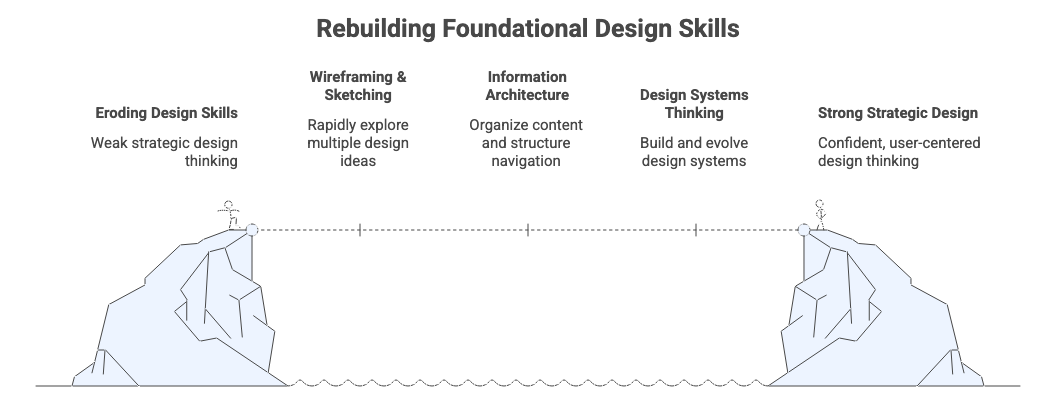
The erosion: Which foundational skills are slipping away
The erosion: Which foundational skills are slipping away
What’s being lost: Not all skills are declining equally. Here’s what’s eroding fastest:
→ Wireframing and quick sketching
Many junior designers now skip straight to polished, AI-generated screens. They’ve lost the ability to rapidly sketch multiple ideas and explore options before committing to one direction.
→ Information architecture
Understanding how to organize content, structure navigation, and build logical systems is becoming rare. Designers can assemble AI-generated components but struggle to explain why information should be organized a certain way.
→ Design systems thinking
Juniors can use existing design systems but can’t build or evolve them. They implement components without understanding the logic behind them or how to extend them for new use cases.
→ Explaining design decisions
When asked “why did you design it this way?”, answers often circle back to “it looked good” or “the AI suggested it” rather than discussing user needs, business goals, or established UX patterns.
→ User flow mapping
The practice of mapping out how users move through an experience before designing screens is disappearing. Designers jump to visuals without understanding the journey.
The pattern:
✓ Execution skills (making things look good) = strong
✗ Strategic thinking (knowing what to make and why) = weakening
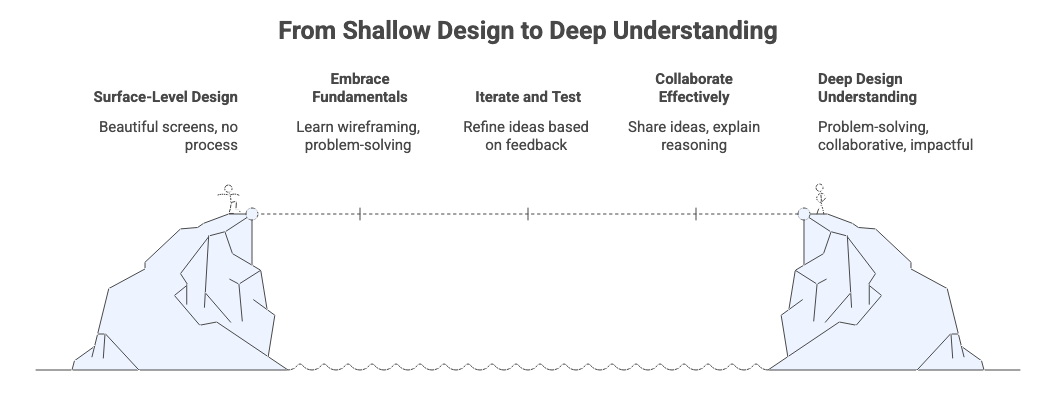
Why it matters: The hidden cost of skipping fundamentals
Why it matters: The hidden cost of skipping fundamentals
The real problem: It’s not that wireframing itself is sacred. It’s that wireframing teaches you to think through problems before jumping to solutions.
When you skip fundamentals, here’s what happens:
1. You get attached to wrong solutions
When your first idea is a beautiful, polished interface (AI-generated or not), you’re less likely to throw it away when testing reveals it doesn’t work. You’ve invested too much too early.
2. You can’t pivot quickly
When problems emerge (and they always do), designers without strong fundamentals can’t rapidly explore alternatives. They’re stuck waiting for tools to generate options instead of problem-solving themselves.
3. Your portfolio stays surface-level
Beautiful screens without clear process or reasoning don’t just hurt your job chances. They reflect shallow understanding of what design actually is.
4. Collaboration breaks down
Senior designers report frustration with juniors who can’t sketch ideas in meetings, participate in whiteboarding sessions, or explain their thinking without leaning on “the tool made this choice.”
One design leader put it this way: “We need designers who use AI tools, not designers who are just the interface between our team and AI. There’s a fundamental difference.”
The paradox: How AI makes basics more important, not less
Here’s the counterintuitive truth: As AI handles more execution work, foundational skills become more valuable, not less.
Why?
Because AI can generate 50 beautiful interface variations in minutes, but it can’t tell you which one actually solves your user’s problem. That requires understanding fundamentals: information architecture, user psychology, interaction patterns.
Think about it this way:
When everyone has access to tools that create beautiful designs, what makes you valuable isn’t making things look good. It’s:
→ Defining the right problem to solve in the first place
→ Understanding why certain design patterns work in specific contexts
→ Recognizing when AI suggestions miss critical user needs
→ Explaining your rationale to skeptical stakeholders
→ Adapting when project constraints change
All of these come from foundational skills.
The designer who can wireframe isn’t valuable because wireframing itself is essential. They’re valuable because wireframing develops spatial thinking, systematic problem-solving, and rapid iteration skills that apply to everything they do.
AI amplifies what you bring to it.
If you only know how to use tools well → AI makes you slightly more efficient
If you deeply understand UX principles → AI makes you exponentially more powerful
Core competencies that still define great designers
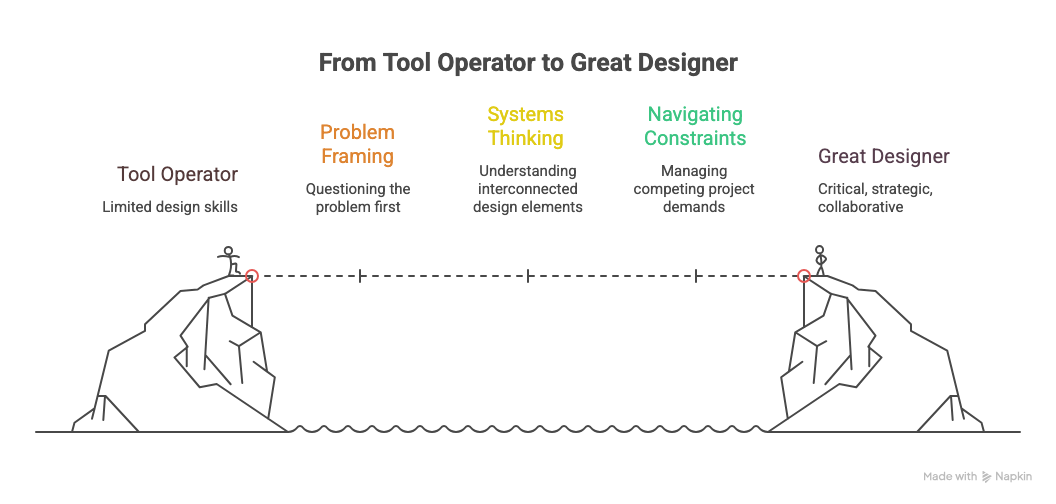
What actually matters: Here’s what separates great designers from tool operators in the AI era:
① Problem framing and research synthesis
Great designers don’t jump to solutions. They question the problem first. This means understanding research, spotting patterns in user behavior, and translating observations into design opportunities.
AI can help analyze data, but only you can decide which problems are worth solving.
② Systems thinking
Understanding how individual pieces fit into the bigger picture. How screens connect to journeys. How one design decision affects others. This requires mental models you build by creating systems from scratch, not just using existing ones.
③ Navigating constraints
Real projects always have competing demands: technical limits, business needs, user requirements, tight timelines. Managing these tradeoffs requires judgment that comes from experience and foundational understanding, not tool proficiency.
④ Collaboration and communication
Design is teamwork. Sketching ideas in meetings. Explaining rationale to engineers. Defending decisions to stakeholders. Receiving critique. These are human skills. AI can help you prepare materials, but it can’t navigate people.
⑤ Pattern recognition
Not just knowing what patterns exist (AI can list those), but knowing why they work, when to use them, and when to break them. This understanding comes from studying fundamentals deeply and is informed by established principles like Jakob Nielsen’s Usability Heuristics.
⑥ Critical evaluation
Most importantly: knowing when AI suggestions are brilliant and when they’re wrong. This requires enough foundational knowledge to evaluate outputs against principles, not just aesthetics.
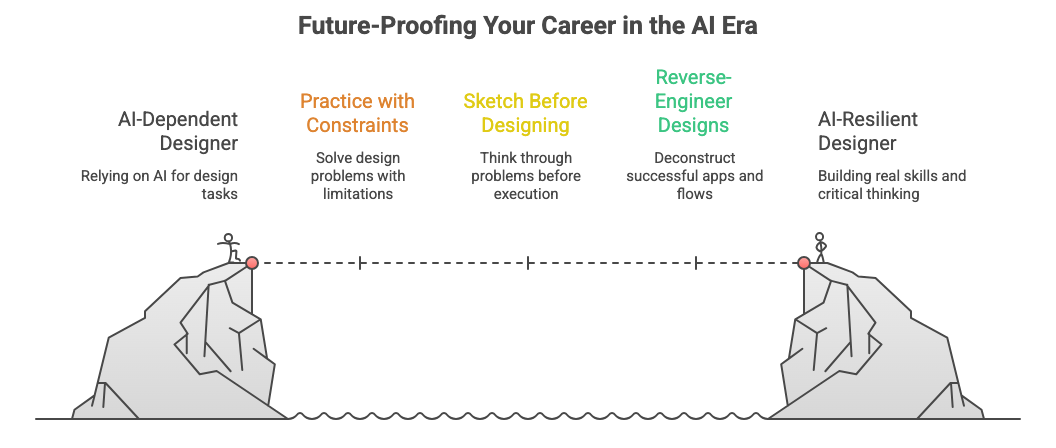
Future-proofing your career in the AI era
Future-proofing your career in the AI era
How to build real skills: Whether you’re a junior worried about this gap or a senior developing others, here’s how to future-proof your approach:
✱ Practice with constraints
Regularly solve design problems with intentional limitations.
Examples:
Design only in black and white
Limit yourself to three screens
Use only standard UI components
Constraints force creative thinking and reveal whether you understand principles or just copy patterns.
✱ Sketch before you design
Before opening any digital tool (AI or traditional), spend 10-15 minutes sketching solutions by hand. Not because sketching is magical, but because it forces you to think through the problem before getting distracted by execution.
✱ Reverse-engineer great design
Take apps you love and deconstruct them.
Map their information architecture
Sketch their user flows
Document their patterns
Understanding why something works builds pattern recognition AI can’t provide. This connects to Don Norman’s principles of good design around discoverability and understanding.
Speaking of Don Norrman, Join him at UXCON26

His work shaped the field long before UX had a familiar name.
His ideas changed how teams build products.
His writing brought clarity where there was confusion.
His thinking continues to guide designers, researchers, engineers, and leaders around the world.
Having him with us at UXCON26 is an honor.
Join us, learn from a legend, and experience what the future of UX can be.
✱ Get human critique, not just AI feedback
AI can catch usability issues, but it can’t teach you how to receive and act on human feedback (a critical career skill). Regularly share work-in-progress with other designers and practice explaining your thinking.
✱ Build something from absolute scratch
Not from a template, not AI-generated. Actually design something complete from first principles. A personal project, a redesign, anything. Force yourself through every decision without shortcuts.
✱ Learn adjacent skills
Understanding basics of front-end development, content strategy, or user research makes you more complete. AI tools are specialists. Your value is connecting domains and seeing bigger pictures.
✱ Document your reasoning
For every project, write down why you made key decisions. Not for your portfolio, for yourself. This builds the articulation muscle that separates designers from tool operators.
💡 Practical tip:
Spend 20% of your design time away from the computer. Sketch, write, map, diagram. Do thinking work without AI. This builds mental muscles AI can’t replace.
Resource Corner
Essential reading:
The Shape of Design by Frank Chimero - Free online book about design thinking fundamentals
Designing with the Mind in Mind by Jeff Johnson - Cognitive psychology every designer should know
Information Architecture, 4th Edition - The definitive guide to structuring digital experiences
Practice resources:
Daily UI - Do challenges without AI first, then compare your solution
UX Challenges - Real design problems to solve
Sharpen.design - Design challenge generator with built-in constraints
Learning paths:
Interaction Design Foundation - Comprehensive UX fundamentals courses
Laws of UX - Essential principles explained clearly
Nielsen Norman Group Articles - Deep dives into UX fundamentals
Community and critique:
Designer Hangout - Slack community for peer learning
ADPList - Free mentorship from experienced designers
Dribbble - Focus on process shots and case studies, not just final designs
Final Thought
The designers who thrive in the AI era won’t be the ones who resist these tools. They’ll be the ones who understand design deeply enough to use them wisely.
AI isn’t the enemy. But AI without fundamentals creates an illusion: beautiful surfaces hiding shallow thinking. The market is already noticing. Hiring managers are testing for foundational skills. Companies are choosing designers who can think, not just prompt.
The good news?
Fundamentals aren’t gatekept or mysterious. They’re learnable and immediately useful. Every great designer built their career on basics before mastering tools. Today’s AI doesn’t change that requirement. It just makes it easier to temporarily fake competence.
Don’t fake it. Build it.
Because when everyone can generate beautiful designs, the designers who understand why those designs work (and when they don’t) are the ones who’ll lead teams, shape products, and build meaningful careers.


