



You’re doing everything right. You scheduled user interviews. You asked people what features they want. You built exactly what they told you. And now nobody’s using it. Sound familiar? Here’s the problem: users are terrible at telling you what they need. Not because they’re lying, but because they don’t know. This issue breaks down why “what do you want?” is the wrong question, and what questions actually lead to breakthrough insights.
In this issue:
Why users can’t tell you what they want (even when they think they can)
The questions that kill good research
What great user interviews actually sound like
How to dig deeper without leading the witness
Turning messy conversations into clear design direction
📦 Resource Corner
Why users can’t tell you what they want (even when they think they can)
There’s a famous Henry Ford quote that gets thrown around a lot: “If I had asked people what they wanted, they would have said faster horses.” Whether he actually said it or not, the principle is real.
Users are experts in their problems. They are not experts in solutions.
When you ask someone “what feature would you like to see?” their brain does something predictable: it reaches for the closest thing they’ve already seen. They suggest features from competitor products. They ask for minor tweaks to what already exists. They give you incremental ideas, not transformative ones.
This isn’t a failure of imagination. It’s how human cognition works. We’re pattern-matching machines. When asked to envision something new, we remix the familiar. (Source: Kahneman, “Thinking, Fast and Slow”)
But here’s the deeper issue: users often don’t know what their real problem is.
They’ll tell you they want a faster checkout process. What they actually need is more trust signals because they’re worried about payment security. They’ll tell you they want more features. What they actually need is the existing features to work more reliably. They’ll tell you the interface is confusing. What they actually mean is the workflow doesn’t match how they think about the task.
Your job as a designer isn’t to collect feature requests. Your job is to understand the gap between what users say and what they actually need.
UXCON26 is partnering with the Interaction Design Foundation, and if you care about where UX is headed, you need to know what that means.
The IxDF isn’t a newcomer riding a wave. They’re the organization that has quietly built the world’s most trusted UX education platform, over 170,000 members across 180+ countries, industry-recognized certifications, and a curriculum shaped by decades of real design practice. When they put their name on something, the community pays attention.
And they’ve put their name on UXCON26.
What that means for you: a conference that doesn’t just talk about design education, it delivers it, live, with the people who wrote the curriculum. October 8th at the Silver Spring Civic Center is going to be unlike any design event you’ve attended.
We currently have a special offer running, but it closes tonight. If you’ve been sitting on it, this is your nudge.
The questions that kill good research
Let’s start with what not to do, because these questions show up in user interviews constantly, and they all produce useless answers.
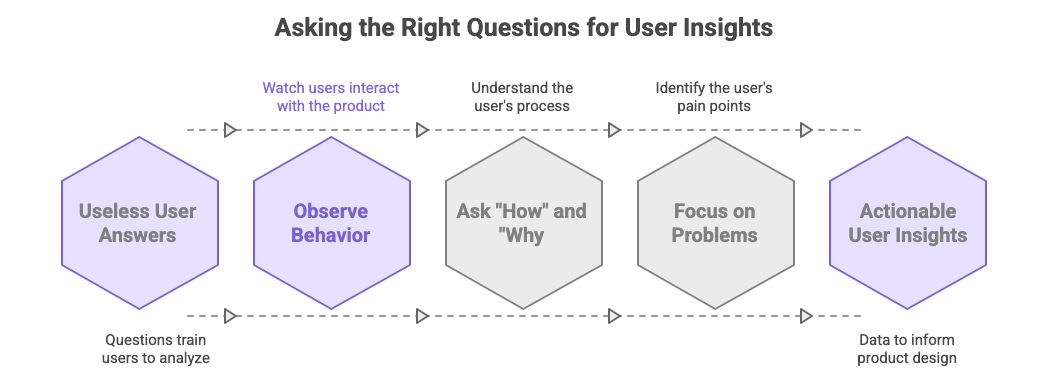
❌ “What features would you like to see?”
This question trains users to think like product managers, not users. They start pitching features. They tell you about other apps they like. They suggest things that sound good in theory but won’t actually solve their problem. You end up with a wishlist, not insights.
❌ “Would you use this feature if we built it?”
People lie. Not intentionally, but they do. When you describe a hypothetical feature, users imagine the best-case version. They imagine it working perfectly. They imagine themselves being more organized, more productive, more disciplined than they actually are. They say “yes, I’d definitely use that.” Then you build it and they don’t. (Source: Nielsen Norman Group on User Research)
❌ “Do you like this design?”
This is asking for an opinion, not an insight. Some people will say yes to be polite. Some will say no because they don’t like the color blue. Some will give you feedback based on personal taste rather than usability. You end up with subjective reactions, not data you can design from.
❌ “Why don’t you use [feature]?”
People are bad at explaining their own behavior after the fact. They’ll give you a rational-sounding explanation that has nothing to do with the real reason. This is called post-hoc rationalization, our tendency to create logical explanations for decisions we made unconsciously or emotionally.
❌ “How often do you do [task]?”
Memory is unreliable. Users overestimate how often they do things they think they should do (exercise, meal planning, budgeting) and underestimate how often they do habitual things (check email, scroll social media). The numbers they give you are usually wrong.
What all these questions have in common: They’re asking users to do your job for you. They’re asking users to analyze their own behavior, predict their future behavior, or design solutions. That’s not their expertise. Their expertise is living the problem.
What great user interviews actually sound like
Good user interviews don’t feel like interviews. They feel like conversations where you’re genuinely curious about someone’s life, work, or struggle.
Here’s the shift: stop asking about the product. Start asking about the context around the product.
Instead of “what features do you want?” ask questions like:
✅ “Walk me through the last time you [did this task].”
This gets you real behavior, not hypothetical behavior. You hear what actually happened: where they were, what tools they used, what went wrong, what they did when it went wrong, how they felt about it.
Example: “Walk me through the last time you tried to book a flight.” Then you hear: “I opened Google Flights, then Kayak, then went back to Google Flights, then checked the airline direct... it took like 45 minutes and I still wasn’t sure I got the best price.”
That’s a real insight. That’s a problem you can solve.
✅ “What’s frustrating about how you do this now?”
This gets you to pain points without asking users to design solutions. They’ll describe the emotional experience: “It takes forever.” “I never know if I’m doing it right.” “I have to ask someone for help every time.”
Those frustrations point to real opportunities.
✅ “What do you do when [problem] happens?”
This reveals workarounds, which are gold. When users build workarounds, they’re telling you the current solution is broken and showing you what the real need is.
Example: “What do you do when you can’t find what you’re looking for in the app?” Answer: “I just Google it and hope the right page comes up.” That tells you navigation is broken and search might be too.
✅ “Show me how you currently do this.”
Have them share their screen or show you physically how they work. Watch what they click. Watch where they hesitate. Watch what they skip. Observation beats self-reporting every time. (Source: Don Norman, “The Design of Everyday Things”)
Speaking of Don Norman, Join him at UXCON26
His work shaped the field long before UX had a familiar name.
His ideas changed how teams build products.
His writing brought clarity where there was confusion.
His thinking continues to guide designers, researchers, engineers, and leaders around the world.
Having him with us at UXCON26 is an honor.
Join us, learn from a legend, and experience what the future of UX can be.
let’s continue
✅ “Tell me about a time when this went really well.”
Positive examples teach you what success looks like from the user’s perspective. What conditions made it work? What did they value about that experience? This helps you understand what to optimize for.
✅ “What else have you tried?”
This reveals the competitive landscape from their perspective, shows you what didn’t work (and why), and often uncovers adjacent problems you didn’t know existed.
The pattern: All these questions are grounded in real behavior, real moments, real experiences. Not hypotheticals. Not opinions. Not feature requests.
How to dig deeper without leading the witness
The first answer someone gives you is almost never the real answer. It’s the surface answer, the socially acceptable answer, the answer they think you want to hear.
Your job is to dig deeper without putting words in their mouth.
The most powerful follow-up question in user research:
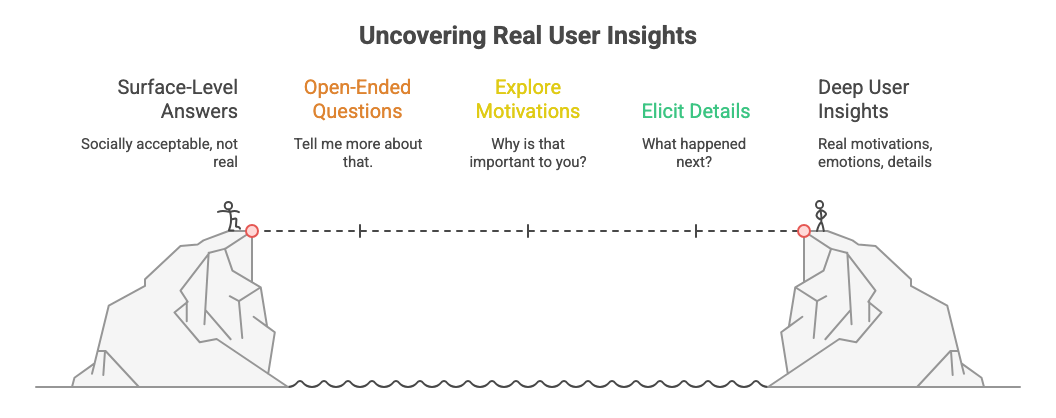
→ “Tell me more about that.”
It’s open-ended. It’s neutral. It doesn’t suggest an answer. It just gives them space to keep talking. And in that space, the real stuff comes out.
Other killer follow-ups:
→ “Why is that important to you?” Gets to underlying motivations and values.
→ “What happened next?” Keeps them in storytelling mode, which surfaces details they’d skip in summary mode.
→ “How did that make you feel?” Uncovers emotional responses, which often drive behavior more than rational factors.
→ “Can you give me an example?” Turns vague statements into concrete scenarios you can design for.
→ “What would have made that easier?” Gets them thinking about solutions in the context of a real moment, not abstract feature brainstorming.
The key is staying curious, not jumping to solutions. When someone says something interesting, resist the urge to say “oh, so what if we built a feature that...” Just keep asking questions. Keep them talking. The insights emerge from the stories, not from direct answers.
A real example of digging deeper:
You: “Walk me through the last time you tried to organize your receipts for taxes.”
User: “Oh, it’s a nightmare. I just throw everything in a folder.”
You: “Tell me more about that.”
User: “Well, I take photos of paper receipts on my phone, but then they’re mixed in with all my other photos. And digital receipts I just leave in my email.”
You: “What happens when you actually need to find a specific receipt?”
User: “I usually can’t. I just scroll through my photos for like 20 minutes hoping I took a picture of it. Or I search my email if I remember which company it was from.”
You: “How does that make you feel?”
User: “Honestly? Stupid. Like I know I should have a better system, but everything I’ve tried is too much work.”
You: “What have you tried?”
User: “I downloaded like three different receipt apps, but they all wanted me to manually categorize everything and it just felt like more work than the problem was worth.”
See what happened there? You started with “organize receipts” and learned:
The real problem is retrieval, not storage
Photos are the default capture method but create a findability problem
They’ve tried dedicated tools but abandoned them because of friction
The emotional trigger is feeling disorganized, not the receipts themselves
That’s enough insight to design something valuable. And you never asked “what feature do you want?”
Turning messy conversations into clear design direction
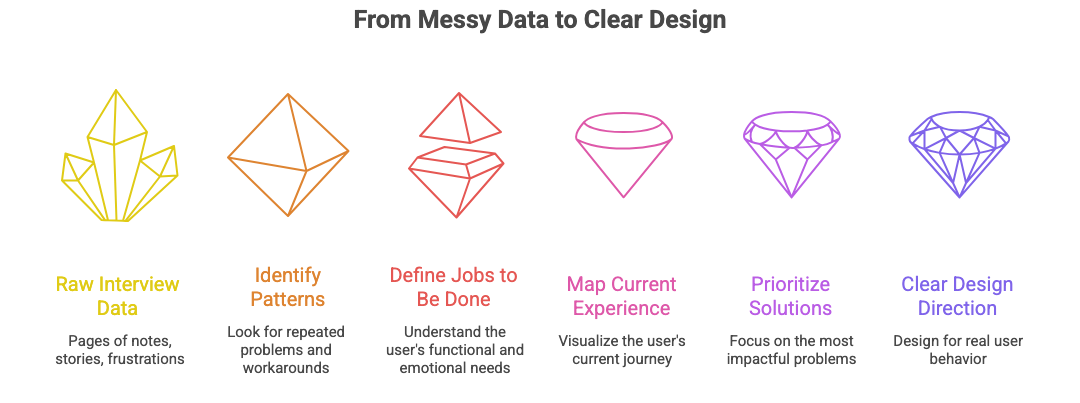
Okay, so you’ve done great interviews. You’ve got pages of notes full of stories, frustrations, workarounds, and context. Now what?
This is where a lot of designers get stuck. They have rich qualitative data but no clear path to design decisions.
Here’s a process that works:
1. Look for patterns across interviews
After 5-7 interviews, you’ll start hearing the same things repeatedly. Those repetitions are your signal. Create a simple list:
What problems came up in 3+ interviews?
What workarounds did multiple people mention?
What emotions came up repeatedly?
2. Identify the “jobs to be done”
What is the user actually trying to accomplish? Not what they said they wanted, but what functional and emotional job are they hiring your product to do? This framework, developed by Clayton Christensen, helps you see past feature requests to real needs. (Source: “Competing Against Luck” by Clayton Christensen)
Example: Users aren’t hiring your budgeting app to “track expenses.” They’re hiring it to “feel in control of their money and not be surprised by their bank balance.”
3. Map the current experience, warts and all
Create a journey map or workflow diagram that shows how users currently solve the problem, including all the friction points, workarounds, and emotional highs and lows. This becomes your “before” state.
4. Prioritize what to solve first
Not all problems are equal. Ask:
Which problem showed up most frequently?
Which problem caused the most frustration?
Which problem has the biggest gap between current and desired state?
Which problem can you actually solve given your constraints?
5. Design for the real behavior, not the ideal behavior
Users told you what they actually do, which is often different from what they think they should do. Design for reality. If users told you they only organize receipts once a year in a panic before tax deadline, don’t design a system that requires daily categorization.
🎯 Take-home: Good research gives you a clear problem statement and real constraints. From there, you can explore solutions with confidence that you’re solving the right problem.
📦 Resource Corner
The Mom Test by Rob Fitzpatrick The single best book on asking good research questions. Short, practical, and full of real examples. Especially strong on why most questions fail and what to ask instead.
Just Enough Research by Erika Hall Practical guide to doing user research that actually informs design. Covers when to do research, how to structure interviews, and how to synthesize findings.
Nielsen Norman Group: User Interviews Research-backed guidance on conducting effective user interviews, including question frameworks and common pitfalls.
Jobs to Be Done Framework Understanding the “job” users are trying to accomplish helps you see past surface requests to deeper needs.
Interviewing Users by Steve Portigal Comprehensive guide to the craft of user interviewing. Good for both beginners and experienced researchers.
UserInterviews.com Blog Practical articles on research methods, recruiting participants, and analyzing findings.
Final Thought
The best product insights don’t come from asking users what they want. They come from understanding what they struggle with, what they’ve tried, what they’ve given up on, and what they do when things go wrong.
Users are incredibly generous with this information when you ask the right questions. They’ll tell you stories. They’ll show you their messy workarounds. They’ll describe their frustrations in vivid detail. Your job is to listen carefully, dig deeper when something sounds interesting, and resist the urge to jump to solutions.
The designers who build products people love aren’t the ones who do what users ask for. They’re the ones who understand users deeply enough to build what they actually need, even when users couldn’t articulate it themselves.
That skill, listening past the surface, is learnable. Start practicing it in your next conversation.


